Disdik Picks is reader-supported. When you buy through links on our site, we may earn a commission at no extra cost to you. As an Amazon Associate, we earn from qualifying purchases. Learn more ›
How to Choose a Baby Monitor: Range, Video and Sound
Learn how to choose a baby monitor by comparing dedicated video monitors, Wi-Fi app models and breathing wearables on range, screen size and privacy.
Nov 19, 2026
Updated Nov 20, 2026
10 min read
5 views
Choosing a baby monitor used to mean picking between audio-only and video. The range now spans simple radio-style video units that work with no internet at all, Wi-Fi cameras that stream to a phone, and wearable systems that track breathing motion and sleep patterns. The right choice depends on the home: apartment size, Wi-Fi reliability, whether grandparents or a sitter need access, and how much data a family actually wants. This guide explains the deciding factors first, then compares five representative monitors that show how the categories differ in practice.
As an Amazon Associate, we earn from qualifying purchases.
Quick answer
Choose a dedicated video monitor such as the Infant Optics DXR-8 PRO or HelloBaby HB6550 for a closed system with no Wi-Fi and instant-on viewing. Choose a Wi-Fi model such as the Nanit Pro or VTech VM901 for phone access, remote viewing and sleep data. Add a wearable system only if breathing-motion alerts matter more than simplicity, and always match range and battery life to the size of the home.
Infant Optics DXR-8 PRO
The DXR-8 PRO is the benchmark for dedicated, non-Wi-Fi video monitors. It pairs a camera with a 5-inch parent screen over a secure radio link, so setup takes minutes and the picture never depends on a router, an app account, or a cloud service. The PRO version adds active noise reduction that filters background sounds such as fans and air purifiers while keeping a baby’s cries clear, plus a brighter, higher-resolution display than the long-running original DXR-8. Interchangeable lenses let the view be tuned: a standard lens for the crib, a zoom lens for detail, and an optional wide-angle lens for a whole toddler room.
Battery life on the parent unit runs through a full day of naps and an evening, and the screen wakes instantly rather than loading an app. There is no recording to the cloud and no remote viewing away from home, which many parents count as a privacy advantage rather than a limitation. Range is rated for typical houses and works through walls, though very large homes should check the layout against any dedicated monitor. For families who want a monitor that behaves like an appliance, the DXR-8 PRO remains the reference point.
The VTech VM901 bridges the two worlds: it includes a 5-inch parent screen for in-home use and connects over Wi-Fi so a phone app can show the same camera from anywhere. The camera pans, tilts, and zooms remotely, offers a wide viewing angle, and records in high definition with night vision for dark nurseries. Two-way talk lets a parent soothe from another room or another building, and the app can send motion and sound alerts to a phone.
That flexibility suits households where a caregiver at home uses the dedicated screen while a parent at work checks in by phone. The trade-offs are the usual Wi-Fi ones: performance depends on the home network, the camera should sit on a secure, updated router password, and app features rely on VTech’s service continuing to run. VTech’s long presence in baby monitors is reassuring on that front. For buyers who cannot decide between a classic monitor and a smart camera, the VM901’s dual approach is a practical middle path.
Nanit Pro Smart Baby Monitor
The Nanit Pro is a camera-first system built around data. Mounted above the crib on the included floor stand, it looks straight down and uses that vantage point for its signature features: breathing motion monitoring when paired with Nanit’s breathing wearables, sleep tracking that summarizes the night, and milestone snapshots saved in the app. There is no dedicated parent screen; viewing happens on phones and tablets through the Nanit app, with background audio and alerts for sound, motion, and crying.
The floor stand version suits renters and families who may move the crib, since it avoids wall drilling, and the stand keeps the cord routed away from the crib as designed. Nanit’s fuller analytics sit behind its Insights subscription plan, so the ongoing cost should be part of the buying decision, and the system depends entirely on Wi-Fi and the app. For parents who want a sleep record and breathing-motion alerts without a wearable sensor on the baby beyond a patterned band, the Nanit Pro is the most developed option in this group.
HelloBaby has built a following by offering large-screen dedicated monitors at accessible prices, and the HB6550 is its flagship style: a 5-inch screen paired with a pan, tilt, and zoom camera over a private radio connection, no Wi-Fi involved. The camera rotates widely enough to survey a whole room, night vision switches on automatically, and the parent unit supports two-way talk, room temperature display, feeding reminders, and lullabies. Battery capacity is a headline feature, with the screen lasting through long stretches between charges in audio or eco modes.
As with other dedicated monitors, there is no phone viewing and no cloud recording, and the brand is younger than legacy names, so long-term parts support is less proven. The value case is strong, though: families get the core experience of the premium dedicated monitors, a big screen, remote camera movement, and temperature monitoring, without paying for app ecosystems they do not want. For a second monitor at a grandparent’s home, or a first monitor on a budget, the HB6550 covers the essentials well.
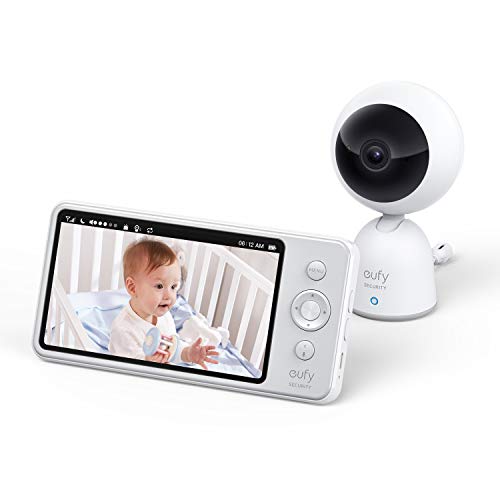
The eufy baby monitor pairs a camera with a 5-inch display in the same dedicated style, with an emphasis on picture clarity and simple controls. The camera pans and tilts from the parent unit, provides clear night vision, and includes a wide-angle lens option in the box on many bundles, which helps cover a play area as the baby grows. Two-way talk, temperature sensing, and sound-activated screen wake round out the core feature set, and the private connection means no account or Wi-Fi setup.
eufy’s monitor line has evolved through several models, so buyers should confirm the exact bundle contents, particularly whether the wide-angle lens and wall mount are included. Battery performance is in line with other 5-inch dedicated units, enough for a day of intermittent viewing. Positioned between the budget and premium dedicated monitors, the eufy appeals to parents who want a sharp picture and a clean interface from a brand they may already know from home security cameras, while keeping the nursery feed off the internet.
How to choose
Decide the connection type first. Dedicated radio monitors are private by design, work during internet outages, and wake instantly, but they only work within range of the parent unit. Wi-Fi monitors add phone viewing from anywhere, recordings, and smart alerts, at the cost of network dependence and account security hygiene. Hybrid models with both a screen and an app split the difference. Next, consider range and layout: stated ranges are measured in open air, so brick walls, floors, and distance shrink real coverage, and larger homes favor Wi-Fi or long-range dedicated units.
Then weigh the extras honestly. Breathing-motion and sleep tracking help some parents and create alert fatigue for others; pan and tilt matter once a baby moves around the crib; temperature displays are useful in rooms that run hot or cold. Check battery life against the household routine, confirm whether extra cameras can be added for siblings, and look at how the camera mounts, since cords must always be kept well out of a baby’s reach. Finally, factor in subscriptions: a lower upfront price with a required plan can cost more over two years than a pricier screen-based monitor with no plan at all.
Who should skip
Skip the smart, subscription-based monitors if the home Wi-Fi is unreliable or if nobody in the household will actually review sleep data after the first month; a dedicated screen does the core job with less fuss. Skip dedicated monitors if a parent travels for work and genuinely wants to check in from away, since no parent unit reaches beyond the home. Also skip buying the most advanced system for a short remaining window of use, such as a toddler nearing the move out of a crib. And anyone uncomfortable with a camera on the home network should stay with a closed radio system rather than wrestling with router settings they will not maintain.
FAQ
Are Wi-Fi baby monitors safe from hacking?
The practical risks are low when basic steps are followed: keep the router and camera firmware updated, use a strong unique password, and enable two-factor authentication on the app account where offered. Most reported incidents involve reused or weak passwords rather than the camera itself. Families who prefer to remove the question entirely can choose a dedicated monitor, which has no internet connection at all.
How long do families typically use a baby monitor?
Most households use one from birth until roughly age two or three, when a child moves to a bed and can come to the parents’ room independently. That lifespan makes durability and battery health worth weighing, and it is why very expensive analytics subscriptions should be judged against about two years of use. A monitor that accepts a second camera can extend its value when a sibling arrives.
Is a breathing monitor a substitute for safe sleep practices?
No. Breathing-motion and wearable monitors are consumer products, not medical devices, and they do not prevent sudden infant death. Safe sleep guidance remains the foundation: place the baby on the back, on a firm flat surface, with no soft bedding or toys in the crib. Parents of premature babies or babies with medical conditions should follow their pediatrician’s advice about any monitoring equipment.
Can one monitor cover two children?
Many systems support additional cameras paired to one parent unit or app, with split-screen or rotating views. Dedicated monitors vary in how many cameras they accept, and Wi-Fi apps usually handle multiple cameras more gracefully. When two rooms are involved, check whether alerts can be set per camera and whether the screen can show both feeds at once before buying.
Final verdict
For most homes, a dedicated video monitor such as the Infant Optics DXR-8 PRO or the HelloBaby HB6550 delivers the calmest everyday experience: instant, private, and simple. Families who want phone access and sleep insight should look at the VTech VM901 or the Nanit Pro, accepting the app and network dependence that comes with them. The eufy sits comfortably between the camps. Choose by connection type first, then by the one or two features the household will still care about at month six.
Find the best razors for women for legs, underarms and sensitive skin. Compare five cartridge, disposable and shave-kit options and choose a smooth shave.
We compared the best comforters for every sleeper, from light all-season inserts to plush king-size picks, so you can find the right warmth for your bed.
We compared the best calculators for students, professionals, and home offices, covering scientific, graphing, financial, printing, and desktop models.

 VTech VM901 Wi-Fi Baby Monitor
 HelloBaby HB6550 Video Baby Monitor
 eufy Baby Video and Audio Monitor







Write Your Review
No reviews yet. Be the first to share your experience!